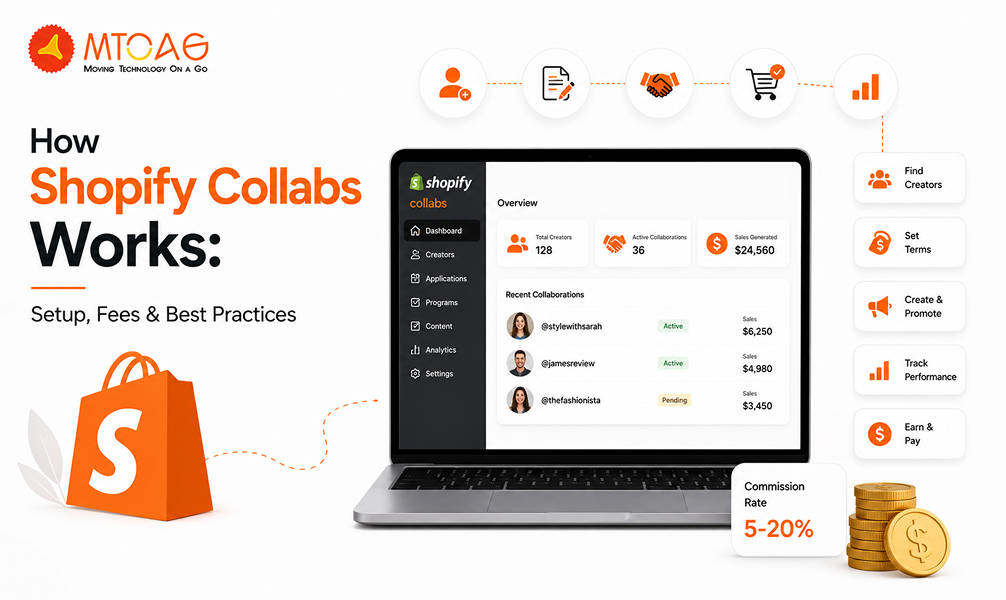
How Shopify Collabs Works: Setup, Fees & Best Practices
The marketing industry isn’t the same as it was a decade ago. It has evolved significantly in response to changing shoppers’ preferences and expectations. Influencer marketing has become one of the fastest ways to grow a business online, and Shopify Collabs is the ideal platform for doing so.
People these days are careful buyers, and they trust when their favourite influencer recommends a brand, especially when they do unboxing or participate in challenges. You will be surprised to know that 74% of Gen Z shoppers spend their free time on shopping sites, and influencers remain their primary channel for product discovery.
Recognizing this trend, Shopify introduced Shopify Collabs, a platform that facilitates partnerships between brands and creators.
The platform is beneficial for both by helping Businesses get good brand visibility and influencers get paid for their content. But how does it work, and what about the cost, eligibility criteria, and how to get started? If you are stuck between these questions, this comprehensive guide will definitely give you better guidance on using the platform and making the most out of it.
What is Shopify Collabs and How Does It Work?
Shopify Collabs is Shopify’s indigenous tool for creators and store owners to simplify brand partnerships and affiliate marketing campaigns. The platform offers a variety of community programs for Shopify Collabs Influencers to connect with brands, promote their brands to their audience, and earn commission from it.
The tool makes it easy for both creators and brands to manage collaborations. They can easily apply for programs and even track their progress and commissions.
Influencers can sign up for the platform with a comprehensive profile that includes details like follower size, engagement rates, niche, channels, and more.
Meanwhile, store owners can easily partner with their niche creators. The platform finds the ideal creator for Shopify merchants, manages their partnership, and even tracks the performance. So, basically, Shopify Collabs can be understood as an automated influencer marketing tool for both creators and brands.
Benefits of Using Shopify Collabs
The creator economy is growing fast, but it’s getting harder for small creators to stand out and earn money. Shopify Collabs helps creators of all sizes by making It easier to get noticed, work with brands, and manage their earnings. Here are the three main ways Shopify Collabs supports creators:
1. Connect with Millions of Brands
Shopify Collabs connects you to over 2.4 million brands worldwide. You can create a profile to showcase your work, making it easy for brands to find you through the app’s search feature.
You can also apply to work with brands you love. This helps you find partnerships that match your interests, creating win-win deals for you and the brands.
2. Get Free Products and Earn Commissions
Brands on Shopify Collabs can send you free products, samples, or gifts. This is called product seeding, and it motivates you to create exciting, authentic content about the products you receive.
On top of that, you can earn money through affiliate commissions. Brands set up their commission rates in the app, and you can track how much you earn from sales.
3. Easy Dashboard to Track Everything
Shopify Collabs has a simple dashboard that tracks your earnings, collaborations, and performance data. Instead of worrying about numbers, you can focus on creating content you love.
The Shopify dashboard organizes all your data, shows you insights, and helps you see where you can improve. It also keeps track of who owes you money, making it easier to manage your work. With Shopify Collabs, creators get the tools they need to grow, connect, and succeed in a busy market.
Eligibility Criteria for Shopify Collabs
Before you get yourself ready to use Shopify Collabs, it is important to be aware of the eligibility criteria and requirements for using the tool. The eligibility criteria are in place to make sure all stakeholders get the best out of their collaboration.
Shopify Collabs Eligibility for Merchants
Shopify Collabs is best for Shopify merchants who want a significant brand presence in a shorter time. However, there are some requirements that need to be fulfilled, including:
Profile completion within Collabs.
You shouldn’t operate a dropshipping store as Shopify doesn’t accept them.
You need to add at least one product with a price in the Collabs Network settings.
Set up auto-payments.
Generate about $10,000 in sales over a period of one year.
Shopify Collabs Eligibility for Creators
Apart from Shopify store owners, there are some rules and criteria for creators that need to be followed before they join the Collabs network.
At least 1,000 followers on a social media platform.
Fully completed and verified Collabs profile.
You can apply to 10 brands each week.
Must be in the locations, such as the US, Canada, or the UK
It is important to note that Shopify has set the minimum follower count to 1,000 only, meaning you can start without having a huge follower base. However, the more followers you get, the more chances you get of securing successful collaborations.
Pricing for Shopify Collabs
Shopify Collabs makes it easy and affordable for creators and brands to work together. Both creators and brands can sign up for Shopify Collabs without paying anything. You don’t even have to pay a subscription fee to use the platform.
However, when creators get paid through Shopify Collabs, there’s a small 2.9% fee on automatic payments. This covers the cost of processing the money. If payments involve different currencies (like dollars to euros), there might be a foreign currency exchange fee.
The Shopify Collabs pricing is much appreciated by small Businesses because there’s no big upfront cost. They only pay when creators help them make sales. It’s low-risk and perfect for brands new to working with influencers.
Additionally, the platform is best for creators as they can join for free and start finding brand deals without spending money. They earn based on the sales they bring in, and only a small fee is taken for processing payments.
How to Set Up Shopify Collabs?
Shopify Collabs makes it easy for brands and creators to work together. Follow these three simple steps to get started and use the app effectively.
Step 1: Download and Set Up the App
Getting Shopify Collabs is super easy. You can find it on the App Store, Google Play, or the Shopify website and install it with one click. Here’s how to set it up:
Go to your Shopify admin panel.
Click on Settings > Apps and sales channels.
Find Shopify Collabs in the list of apps and select it.
Agree to the terms and conditions, then click OK to finish the setup.
That’s it! You’re ready to start using Shopify Collabs.
Step 2: Build Your Community Page
Your community page is where creators learn about your brand and sign up to work with you. Shopify Collabs helps you create this page with these five parts:
Page Design: Add your logo, choose a background colour, and include buttons like “Apply Now” for a modern look. Try the Blum theme for a clean style.
About Your Brand: Write a short title and description about your business. Decide where to place buttons to grab attention.
Collab Benefits: List what creators get, like free products or commissions, to encourage them to join.
Images: Show clear, detailed pictures of your products.
Social Media: Choose which platforms (like Instagram, YouTube, TikTok, Facebook, Twitter, or Twitch) you want creators to use for promotions. You can turn on or off any platform.
Profile Info: Ask creators for details like their name, email, date of birth, location, or gender to match your target audience. You can also ask for their social media profiles.
Survey: Create questions to find the right creators. Use short answers, long answers, multiple-choice, or dropdown menus to learn more about them.
Step 3: Find the Right Creators
Shopify Collabs helps you find creators who fit your brand. Here are two ways to do it:
Search Parameters: Look for creators using filters like:
Social media platform (e.g., Instagram or TikTok).
Keywords, hashtags, usernames, or locations.
Categories, follower counts, or engagement metrics.
Include or exclude specific creators or lists.
Search Results: Narrow down your search with these tools:
Metrics: Check a creator’s followers, average likes, views, or engagement rate.
Growth: Look at data from the last 7 or 30 days to see how they’re doing.
Sort: Organize results by growth, metrics, follower count, or post
Tips to Get the Most Out of Shopify Collabs
Shopify Collabs helps brands and creators work together to boost sales and grow. These five simple tips will help you get the most out of your collaborations and build strong, lasting partnerships.
1. Communicate Clearly
Good communication is key to great collaborations. Talk regularly with your partners to make sure everyone understands the plan. Be clear about what you want, like campaign goals, tasks, and deadlines, so there’s no confusion.
Use Shopify Collabs’ messaging tool to keep all your chats in one place. This makes it easy to track what’s been said. Also, listen to your partners’ ideas and feedback—they might have great suggestions to make the collaboration even better.
2. Set Realistic Goals
Not every collaboration will bring huge results right away. Things like audience size, engagement, and how well the product fits the audience can affect outcomes. Start with small campaigns to see what works for your brand or niche. This helps you learn and improve before going bigger.
While quick sales are great, building brand awareness and long-term customer connections is just as important. Set both short-term goals (like sales) and long-term goals (like growing your audience) to measure success.
3. Use Data to Improve
Shopify Collabs gives you data to see how your campaigns are doing. Check these key numbers regularly:
Click-through rates: How many people click your links?
Conversion rates: How many clicks turn into sales?
Sales: Total money earned from the campaign.
Engagement: Likes, comments, and shares on posts.
Payments: Track what you’ve earned or paid.
Use this info to make your campaigns better. For example, if some products or post types do well, focus on those. Try different ideas and test what works best to keep improving. The payments dashboard also helps you track money and calculate profits.
4. Make Campaigns Personal
Every creator has their own style and audience, so your campaigns should match their vibe. Share details about your brand, like what makes it special and who your customers are. This helps creators make content that feels real and connects with their followers.
Encourage creators to share honest stories about your products—authentic posts get more likes and sales. You can also offer special deals or unique product bundles just for their audience to make the campaign feel extra personal.
5. Build Long-Term Partnerships
One-time collaborations can help with quick sales, but long-term partnerships are even better. Work with creators who do well and share your brand’s values. Over time, they can become true fans of your brand, making their content more trustworthy and effective.
Show your best creators some love by offering Perks like early access to new products, higher commissions, or a chance to give ideas for new products. These strong relationships turn creators into brand ambassadors, not just one-time promoters.
Conclusion
Shopify Collabs is a fantastic tool for anyone running an online store. It is a trustworthy platform that makes working with influencers easy and helps your business grow. We love Shopify Collabs because it takes the hassle out of connecting brands with creators.
Before, finding the right influencers was hard and took a lot of time. Now, brands can use one platform to find creators who truly match their style and create great content. Plus, influencers get an easy way to find brands they like, apply to work with them, and make money from their posts. This makes it a win-win for everyone, helping both brands and creators build strong partnerships and grow together.
So, that’s the kind of impact influencer marketing can have on a business. However, we still believe organic marketing deserves priority, especially in the early stages of building a brand. At Mtoag Technologies, we help businesses grow through both Shopify development and SEO services, enabling brands to build high-performing online stores while creating long-term visibility that supports consistent growth.
FAQs for Shopify Collabs
How Many Followers Do I Need for Shopify Collabs?
You need at least 1,000 followers on one social media platform, like Instagram or YouTube, to join Shopify Collabs. This low requirement makes it easy for small creators to start working with brands and monetize their content.
How to Qualify for Shopify Collabs?
To qualify, creators need 1,000+ followers on a social media platform and must create original content. Merchants need a Shopify store, at least one product listed, $10,000 in sales over the past year, and auto-payments set up. Dropshipping stores are not allowed.
How Does Shopify Collabs Pay?
Shopify Collabs pays creators through automatic payouts for sales made via their affiliate links. Merchants set commission rates, and a 2.9% processing fee applies to payments. You can track earnings on the dashboard, with payments sent directly to your account.
How Many Collabs Can You Have on One Post?
Shopify Collabs doesn’t limit the number of collaborations in a single post, but it’s best to focus on one or two brands to keep content authentic and engaging. Too many collabs in one post might confuse your audience or reduce effectiveness.
Why Did My Collab Post Disappear?
Your collab post might disappear if it violates Shopify Collabs’ guidelines, like using copied content or not disclosing the partnership. Technical issues or merchant's removal of the offer could also cause it. Check the guidelines and contact support if needed.
Is Shopify Collabs Free?
Yes, Shopify Collabs is free to install for both creators and merchants. There are no subscription fees. Merchants pay a 2.9% processing fee on automatic payouts, and currency exchange fees may apply. Creators pay nothing to join or use the platform.
How to Leave a Shopify Collab?
To leave a Shopify Collab, go to your Collabs dashboard, find the collaboration, and select to end or pause the partnership. Notify the brand via the messaging tool for clarity. Check the app’s terms to ensure you have met all obligations before leaving.
How to Find Brands on Shopify Collabs?
Browse the Shopify Collabs marketplace to find brands that match your style and audience. Use filters like niche, location, or product type to narrow your search. You can also apply directly to brands’ affiliate programs or wait for them to contact you.
How to Make a Shopify Collabs Account?
Download the Shopify Collabs app from the Shopify App Store, Google Play, or App Store. Sign up with your email, create a profile with your social media details, and accept the terms. For merchants, install it via the Shopify admin panel.